
- Teacher: Admin User
Moodle is an open-source Learning Management System (LMS) that provides educators with the tools and features to create and manage online courses. It allows educators to organize course materials, create quizzes and assignments, host discussion forums, and track student progress. Moodle is highly flexible and can be customized to meet the specific needs of different institutions and learning environments.
Moodle supports both synchronous and asynchronous learning environments, enabling educators to host live webinars, video conferences, and chat sessions, as well as providing a variety of tools that support self-paced learning, including videos, interactive quizzes, and discussion forums. The platform also integrates with other tools and systems, such as Google Apps and plagiarism detection software, to provide a seamless learning experience.
Moodle is widely used in educational institutions, including universities, K-12 schools, and corporate training programs. It is well-suited to online and blended learning environments and distance education programs. Additionally, Moodle's accessibility features make it a popular choice for learners with disabilities, ensuring that courses are inclusive and accessible to all learners.
The Moodle community is an active group of users, developers, and educators who contribute to the platform's development and improvement. The community provides support, resources, and documentation for users, as well as a forum for sharing ideas and best practices. Moodle releases regular updates and improvements, ensuring that the platform remains up-to-date with the latest technologies and best practices.
Links of interest:
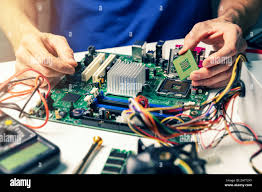
Computer Installation and Maintenance is a practical and competency-based course designed to equip learners with the knowledge and hands-on skills required to assemble, install, configure, and maintain computer systems and related hardware and software. The course introduces students to computer components, system requirements, safety precautions, and industry-standard installation procedures.
Learners will gain experience in installing operating systems, device drivers, and application software, as well as performing system upgrades, troubleshooting common hardware and software problems, and carrying out preventive maintenance. Emphasis is placed on safe working practices, proper use of tools, data protection, and professional ethics in ICT environments.
By the end of the course, students will be able to set up a fully functional computer system, diagnose and fix basic faults, and provide routine technical support in homes, offices, schools, and business environments. The course prepares learners for entry-level ICT support roles and further studies in information technology.
Key Learning Areas:
Identification of computer hardware components
Computer assembly and disassembly
Installation of operating systems and drivers
Software installation and configuration
Troubleshooting and basic repairs
Preventive maintenance and safety practices
Basic networking and peripheral installation